Track Labour, Equipment,
and Materials,
All in One Place.
Paper timesheets and manual data entry drain your admin team and invite costly errors. SiteMax Time Center gives you real-time visibility into where your crews are, what equipment is running, and exactly how many hours to pay, with automated overtime, lunch deductions, and direct QuickBooks integration.
Bad Time Data Is the Silent
Margin Killer in Construction.
Every construction company fights the same battle: getting accurate time from the field to payroll without losing hours to manual entry, disputes, and errors. Paper timesheets get lost. Buddy punching inflates costs. Overtime calculations are a spreadsheet nightmare.
And by the time you catch a mistake, payroll has already run.
Two Connected Modules.
One Clean Path
From Field to Payroll.
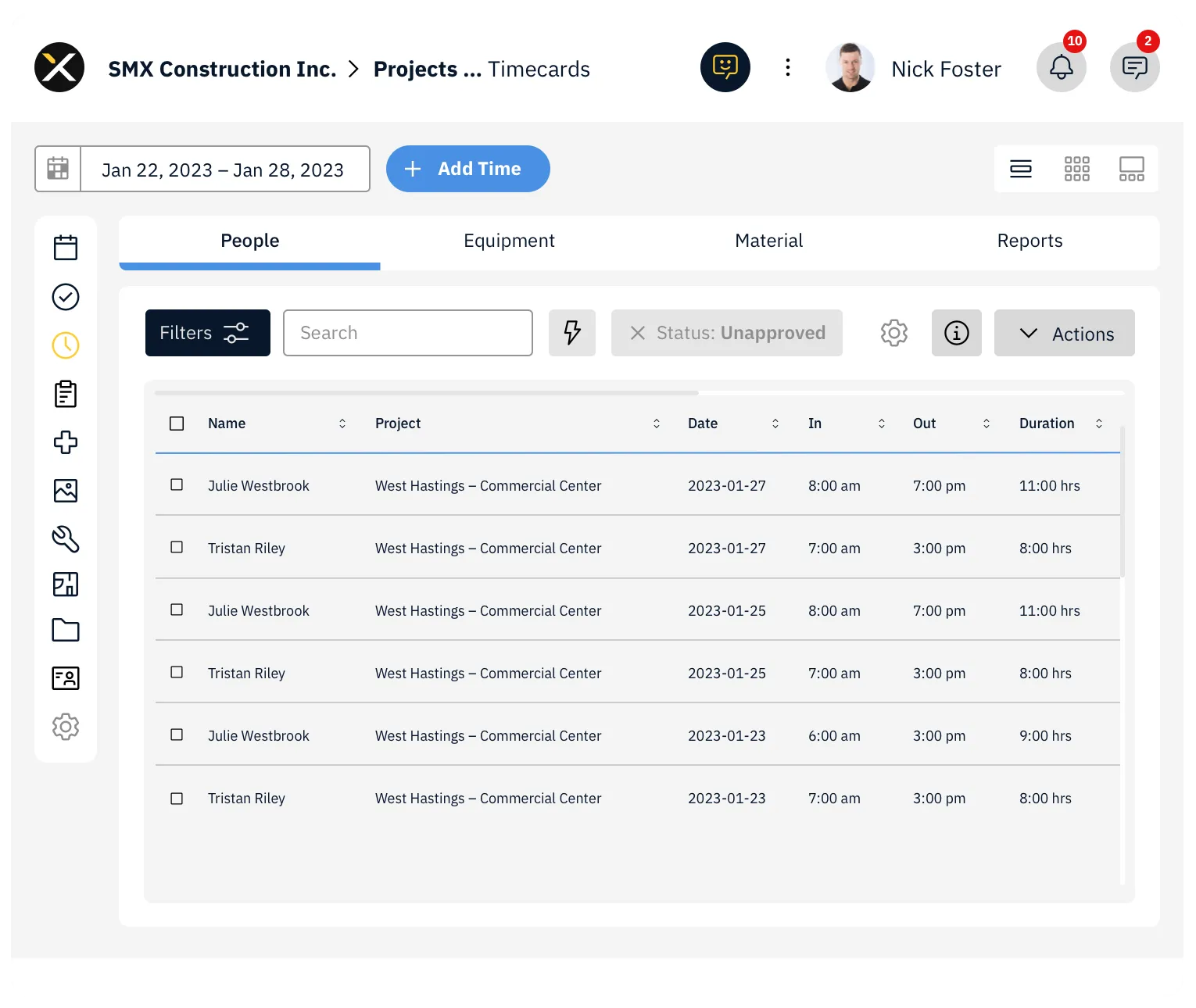
SiteMax gives you two powerful, connected modules, Time Center and Timecards, to capture, manage, approve, and export your time data with confidence.
Time Center provides a company-wide panoramic view of all time entries across every project and user. It's your command center for managing labour, equipment, and materials in one place.
Timecards gives project-level focus, guiding your team through precise time entry management tailored to each specific project.
Accurate Hours.
Automated Calculations.
Clean Payroll.
Workers check in and out from their mobile devices with GPS geofencing, so you know exactly who's on site and when. Manual entries are flagged with distinct status icons, green globe for inside the geofence, red for outside, giving you instant visibility into data quality.
Configure overtime rules by day, consecutive days, or weekly thresholds. Set up automatic lunch deductions based on shift length, start time, and duration. Rules can be tailored by classification, user tags, and project tags, so your BC crew and your Alberta crew can each follow their own regulations automatically.
Approved and processed time entries push straight to QuickBooks Online. No re-keying, no export-import dance, no reconciliation headaches. Your payroll data flows cleanly from the field to your accounting system.
The Grid, List, and Tile views give you multiple ways to monitor your entire workforce. Filter by user, project, classification, cost code, work type, or status. Save your favourite filter combinations as custom views that persist between sessions.
Equipment can have its own timecard or be logged alongside a user's time entry. Track where every piece of equipment is running and for how long. Log material usage in the Material tab to keep track of consumables and stock levels.
Every Hour, Captured Cleanly
at the Source.
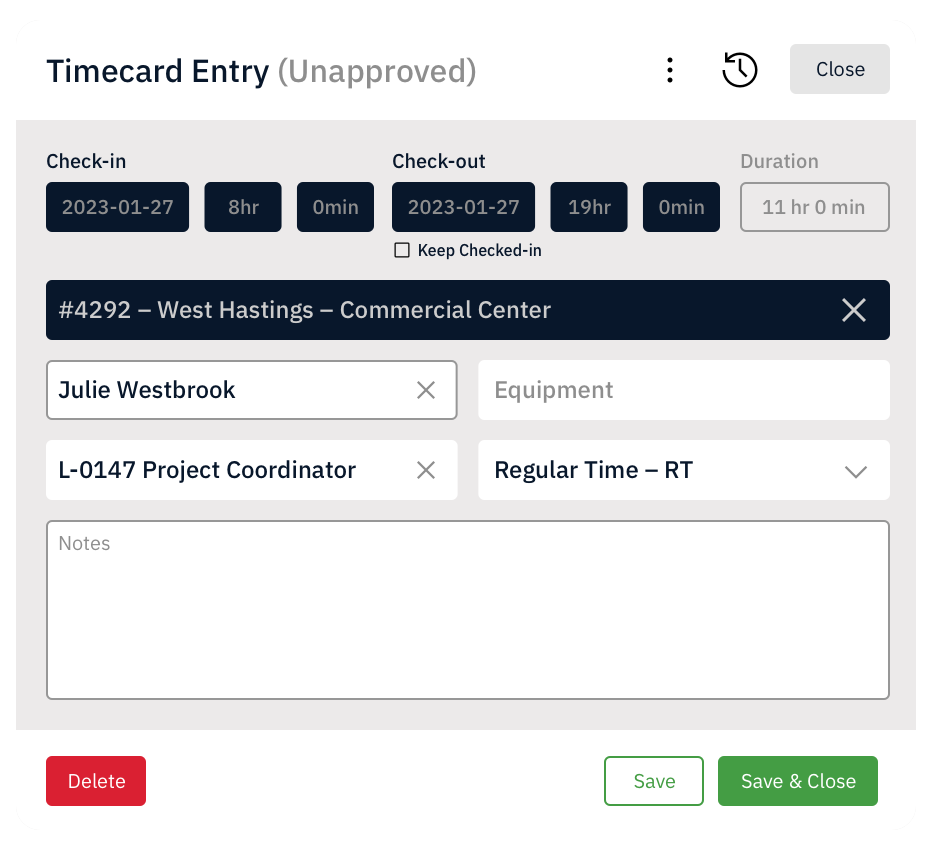
Workers and supervisors log hours from a phone or tablet, with crews, projects, and cost codes pre-loaded. Allocate time by phase, task, or activity. Add notes when context matters.
Custom fields, classifications, and time types give you exactly the structure your accounting and reporting need, without making the field worker's job harder.
Everything You Need
From Check-In to Payroll Export.
- List View: Detailed rows of every time entry with full column customization, sorting, and filtering. Display up to 500 entries. Manage status icons at a glance.
- Tile View: Simplified view showing each team member's timecard at a glance. Ideal for quick check-ins on crew status.
- Grid View: Editable grid format for fast updates. Add, edit, or review entries directly. Export as PDF with or without check-in/out times.
Perform bulk operations on selected time entries:
- Submit, Approve, Process — move entries through your approval workflow
- Bulk Edit — update User, Project, Cost Code, Work Type, Classification, Time Type, Notes, or Mileage across multiple entries
- Lock/Unlock — prevent further edits after approval
- Close/Reopen — mark entries as complete
- Push to QuickBooks — send processed entries directly to your accounting system
- Delete — remove entries when needed (note: cannot be recovered)
Filter time entries by User, User Tags, Project, Project Tags, Classification, Company Cost Code, Work Type, and Status (Open, Submitted, Approved, Processed). Save filter combinations as My Views for instant recall.
- GPS Check-In/Out: Workers check in from mobile with geolocation recorded automatically
- Manual Check-In: Start the clock from Time Center or Timecards with "Keep Checked In"
- Manual Time Entry: Enter time in and time out with all details (Project, Users, Cost Codes, Custom Fields)
- Duration-Only Workflow: Disable check-in/out entirely and use manual duration entries
Build overtime presets with multiple rule types:
- Day rules: e.g., overtime after 8 hours
- Weekly rules: e.g., overtime after 40 hours per week
- Consecutive day rules: for extended work periods
Configure by User Tags, Classifications, or Project Tags. Exclude specific Cost Codes or Work Types. Set target days, target dates (stat holidays), and excluded dates. Rules apply in order, broader rules first, most specific last.
Create lunch deduction rules with:
- Deduction Start Time
- Required Time Worked before Deduction
- Deduction Duration
- Rules by Classification, User Tags, and Project Tags
The system automatically splits time entries to account for lunch breaks, associating a dedicated cost code for clean reporting. Multiple rules can be stacked and reordered for different crews.
Round check-in/out times to the nearest 5 to 45 minutes. Choose Nearest, Round Up, or Round Down. Actual times are still recorded and exportable for audit purposes.
Create custom Time Types (Regular, Overtime, Double Time, etc.) with specific codes. Customize Cost Type Codes for Labour, Equipment, and Materials to match your accounting software.
Add company-specific fields to time entries, measured in decimals, integers, or other types. Set minimum and maximum values. Apply to specific Titles. Make fields optional, required, or required at checkout only. Custom Fields are calculable in Time Reports.
Build custom report templates. Load reports by date range and template. Filter by User, Project, Classification, Equipment, Cost Code, Work Type, and Status. Export as CSV, XLSX, or PDF. Email reports directly to recipients, they don't need a SiteMax account to view them.
Hot Tip: Email reports without loading them on screen first, ideal for large datasets.
Automate report delivery so stakeholders receive time data on the schedule they need, without anyone having to remember to send it.
Define Payable Items, Billable Items, and Overhead costs by combining Time Type, Classification, Work Type, and Cost Code. Set multipliers or rates for each. Assign rules to automate financial calculations across your time data.
Set a default project geofence radius. Optionally prevent check-in or checkout outside the geofence. Status icons show at a glance whether entries were recorded inside or outside the fence.
Three distinct permission levels provide granular control:
- Time Entries (Self): View, check-in/out, edit own entries, delete own entries
- Timecards: View, create, edit, and manage time for assigned project users
- Timecenter: Full company-wide access to view, create, edit, and manage all entries
Apply permissions individually or through Templates. Collaborator and Full User access levels are clearly distinguished.
Built for Every Role
That Touches a Timecard.
Who need accurate labour costs and clean payroll data.
Who want real-time crew visibility without chasing paper timesheets.
Who spend too many hours on manual time entry and reconciliation.
Who need a fast, reliable way to log crew and equipment time on site.
Out of Payroll.
See how SiteMax Time Center can automate your time tracking from check-in to QuickBooks. Book a personalized demo with our team.